<?xml version="1.0" encoding="UTF-8"?>
<!--Generated by Squarespace V5 Site Server v5.13.159 (http://www.squarespace.com) on Sat, 25 May 2013 11:57:59 GMT--><feed xmlns="http://www.w3.org/2005/Atom" xmlns:dc="http://purl.org/dc/elements/1.1/"><title>SIMUL8 2010</title><subtitle>SIMUL8 2010</subtitle><id>http://www.novasim.com/simul8-2010/</id><link rel="alternate" type="application/xhtml+xml" href="http://www.novasim.com/simul8-2010/"/><link rel="self" type="application/atom+xml" href="http://www.novasim.com/simul8-2010/atom.xml"/><updated>2011-05-16T21:14:34Z</updated><generator uri="http://five.squarespace.com/" version="Squarespace V5 Site Server v5.13.159 (http://www.squarespace.com)">Squarespace</generator><entry><title>Dynamic Calendars for Objects</title><category term="Exceptional"/><category term="Professional"/><id>http://www.novasim.com/simul8-2010/dynamic-calendars-for-objects.html</id><link rel="alternate" type="text/html" href="http://www.novasim.com/simul8-2010/dynamic-calendars-for-objects.html"/><author><name>NovaSim</name></author><published>2010-04-13T18:20:00Z</published><updated>2010-04-13T18:20:00Z</updated><content type="html" xml:lang="en-US"><![CDATA[<div>
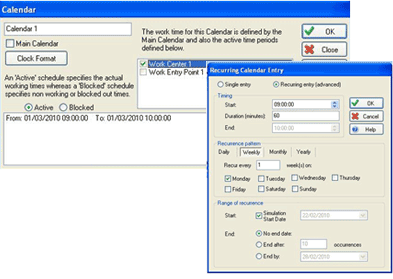
<p>SIMUL8 2010's new object calendars let you turn simulation objects (including resources) on or off according to a date-based availability pattern.&nbsp; Calendars also allow you to tie your simulation directly to a specific date.&nbsp; For example, you can start your simulation on Jan. 1, 2010 and have all work centers shut down on Dec. 25, 2010.&nbsp;</p>
</div>
<div>
<p>The calendars feature recurring events (daily, weekly, monthly etc.) and are fully supported by Visual Logic, so you can completely configure and  control your calendars even at run time.</p>
<p>We think that many users will find this to be a very useful and convenient capability.</p>
<p><span class="full-image-block ssNonEditable"><span><img src="http://www.novasim.com/storage/simul8-images/SIMUL8_Dynamic_Calendars.png?__SQUARESPACE_CACHEVERSION=1270236425020" alt="" /></span></span></p>
</div>
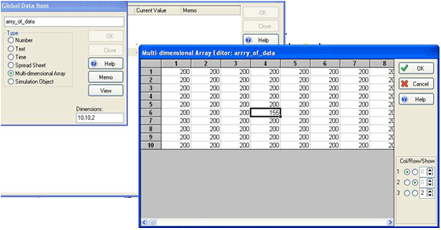
<div></div>]]></content></entry><entry><title>Directly Edit Multi-dimensional Arrays</title><id>http://www.novasim.com/simul8-2010/directly-edit-multi-dimensional-arrays.html</id><link rel="alternate" type="text/html" href="http://www.novasim.com/simul8-2010/directly-edit-multi-dimensional-arrays.html"/><author><name>NovaSim</name></author><published>2010-04-02T18:25:13Z</published><updated>2010-04-02T18:25:13Z</updated><content type="html" xml:lang="en-US"><![CDATA[<p>You can now quickly and easily edit arrrays without having to get into Visal Logic programming.﻿ Earlier versions of SIMUL8 required that all editting of arrays be done only through Visual Logic.</p>
<p><span class="full-image-block ssNonEditable"><span><img src="http://www.novasim.com/storage/simul8-images/SIMUL8_Edit_Array.png?__SQUARESPACE_CACHEVERSION=1270234432418" alt="" width="563" height="293" /></span></span></p>]]></content></entry><entry><title>Stacked Area Charts</title><category term="Professional"/><id>http://www.novasim.com/simul8-2010/stacked-area-charts.html</id><link rel="alternate" type="text/html" href="http://www.novasim.com/simul8-2010/stacked-area-charts.html"/><author><name>NovaSim</name></author><published>2010-04-02T18:24:30Z</published><updated>2010-04-02T18:24:30Z</updated><content type="html" xml:lang="en-US"><![CDATA[<div>
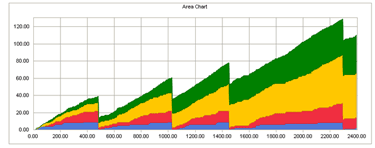
<p>A new chart display option has been added to provide 'Area Charts'. Area Charts give a proportional view of result totals. The chart series are plotted on top of each other (stacked). This chart type is very useful for visibly comparing one series against  another.</p>
<p>&nbsp;</p>
<p><span class="full-image-block ssNonEditable"><span><img src="http://www.novasim.com/storage/simul8-images/SIMUL8_Stacked_Charts.png?__SQUARESPACE_CACHEVERSION=1270234753847" alt="" /></span></span></p>
</div>
<div></div>
<p>﻿</p>]]></content></entry><entry><title>Windows 7</title><id>http://www.novasim.com/simul8-2010/windows-7.html</id><link rel="alternate" type="text/html" href="http://www.novasim.com/simul8-2010/windows-7.html"/><author><name>NovaSim</name></author><published>2010-04-02T18:22:23Z</published><updated>2010-04-02T18:22:23Z</updated><content type="html" xml:lang="en-US"><![CDATA[<p>SIMUL8 2010 is fully compatible with Windows 7.</p>
<p>﻿<span class="full-image-block ssNonEditable"><span><img src="http://www.novasim.com/storage/logos-and-banners/windows_7.png?__SQUARESPACE_CACHEVERSION=1270232650881" alt="" /></span></span></p>]]></content></entry><entry><title>Enhancements to Custom Reports</title><category term="Exceptional"/><category term="Professional"/><id>http://www.novasim.com/simul8-2010/enhancements-to-custom-reports.html</id><link rel="alternate" type="text/html" href="http://www.novasim.com/simul8-2010/enhancements-to-custom-reports.html"/><author><name>NovaSim</name></author><published>2010-04-02T18:21:53Z</published><updated>2010-04-02T18:21:53Z</updated><content type="html" xml:lang="en-US"><![CDATA[<div>
<div>
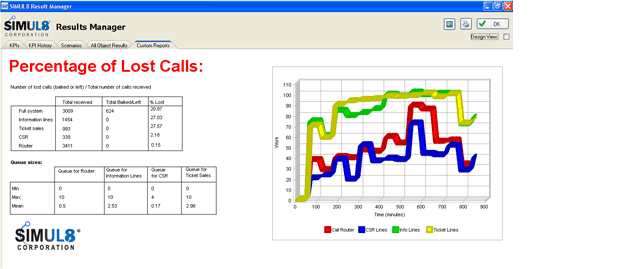
<p>Custom Reports let you automatically create professional reports to help you effectively communicate the results of your simulation. Improvements inculde a new text format palette, image drag-and-drop, and the ability to insert tables. You can create as many custom reports as you like.</p>
</div>
<div></div>
<div>
<p>Also included is a new Visual Logic event that runs before a report is  opened. This allows you to dynamically adjust the content of your report, giving you total control  and flexibility.</p>
<p>Enhanced custom reports are available only in the professional edition.</p>
</div>
</div>
<p>﻿<span class="full-image-block ssNonEditable"><span><img src="http://www.novasim.com/storage/simul8-images/SIMUL8_Custom_Report.png?__SQUARESPACE_CACHEVERSION=1270234967842" alt="" /></span></span></p>]]></content></entry><entry><title>Spreadsheet Based Charts</title><category term="Exceptional"/><category term="Professional"/><id>http://www.novasim.com/simul8-2010/spreadsheet-based-charts.html</id><link rel="alternate" type="text/html" href="http://www.novasim.com/simul8-2010/spreadsheet-based-charts.html"/><author><name>NovaSim</name></author><published>2010-04-02T18:21:18Z</published><updated>2010-04-02T18:21:18Z</updated><content type="html" xml:lang="en-US"><![CDATA[<div>
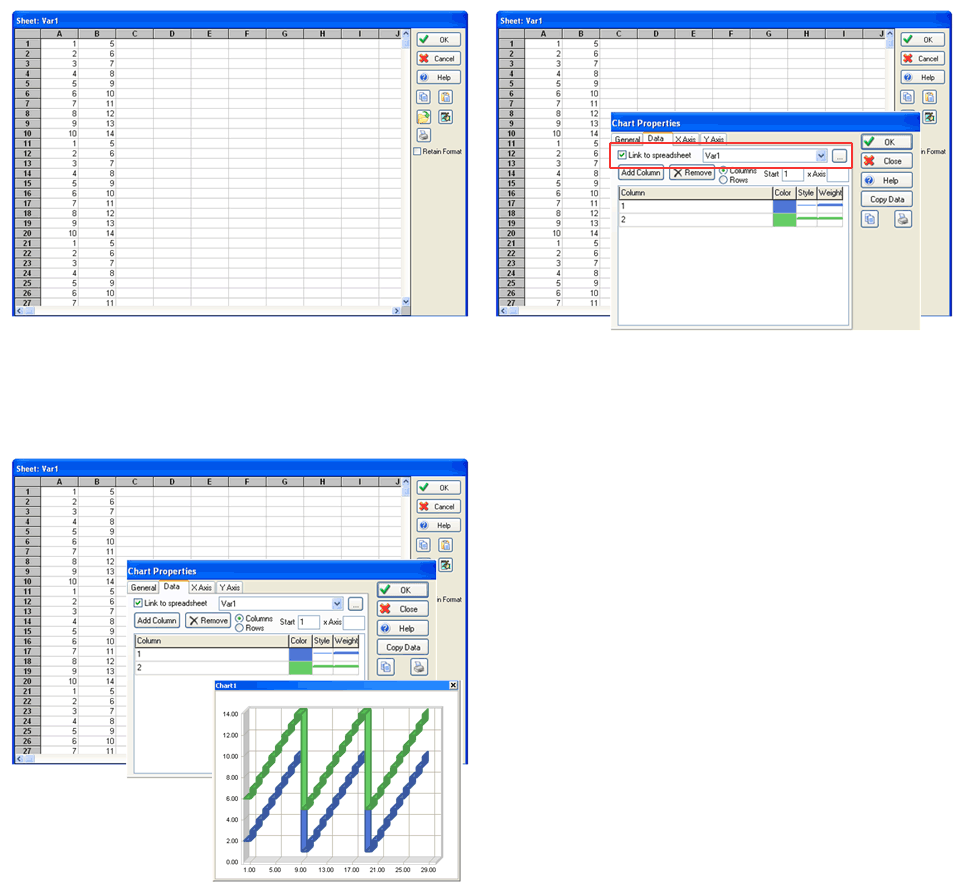
<p>Although SIMUL8 has had charts in their internal spreadsheets for more than 10 versions, they were not dynamic.&nbsp; This meant that your chart would only remain correct as long as the number of data points didn't change.</p>
<p>SIMUL8 2010 solves this problem by allowing you to dynamically create charts from data stored within SIMUL8 internal  spreadsheets. The new dynamic charts also allow for totally customized axes, data ranges, series and points. This gives you complete control over your charts at run time.</p>
</div>
<div></div>
<p>﻿<span class="full-image-block ssNonEditable"><span><img src="http://www.novasim.com/storage/simul8-images/SIMUL8_Spreadsheet_Charts.gif?__SQUARESPACE_CACHEVERSION=1270235955216" alt="" /></span></span></p>]]></content></entry><entry><title>Dynamic Image Browser</title><id>http://www.novasim.com/simul8-2010/dynamic-image-browser.html</id><link rel="alternate" type="text/html" href="http://www.novasim.com/simul8-2010/dynamic-image-browser.html"/><author><name>NovaSim</name></author><published>2010-04-02T18:20:16Z</published><updated>2010-04-02T18:20:16Z</updated><content type="html" xml:lang="en-US"><![CDATA[<div>
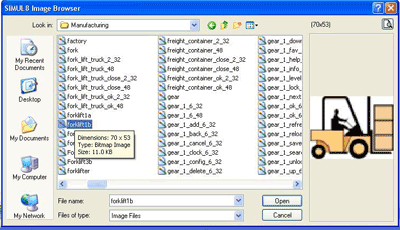
<p>Making your simulation look good is critical in presenting your results to  others. In SIMUL8 2010 there is a new image browser that lets you easily browse your entire PC and quickly see a preview of all the images in any directory,  making it easy to find the best image.</p>
</div>
<div></div>
<p>﻿<span class="full-image-block ssNonEditable"><span><img src="http://www.novasim.com/storage/simul8-images/SIMUL8_Image_Browser.png?__SQUARESPACE_CACHEVERSION=1270236738412" alt="" /></span></span></p>]]></content></entry><entry><title>Gantt Chart Views of Shift Patterns</title><category term="Professional"/><id>http://www.novasim.com/simul8-2010/gantt-chart-views-of-shift-patterns.html</id><link rel="alternate" type="text/html" href="http://www.novasim.com/simul8-2010/gantt-chart-views-of-shift-patterns.html"/><author><name>NovaSim</name></author><published>2010-04-02T18:19:51Z</published><updated>2010-04-02T18:19:51Z</updated><content type="html" xml:lang="en-US"><![CDATA[<div>
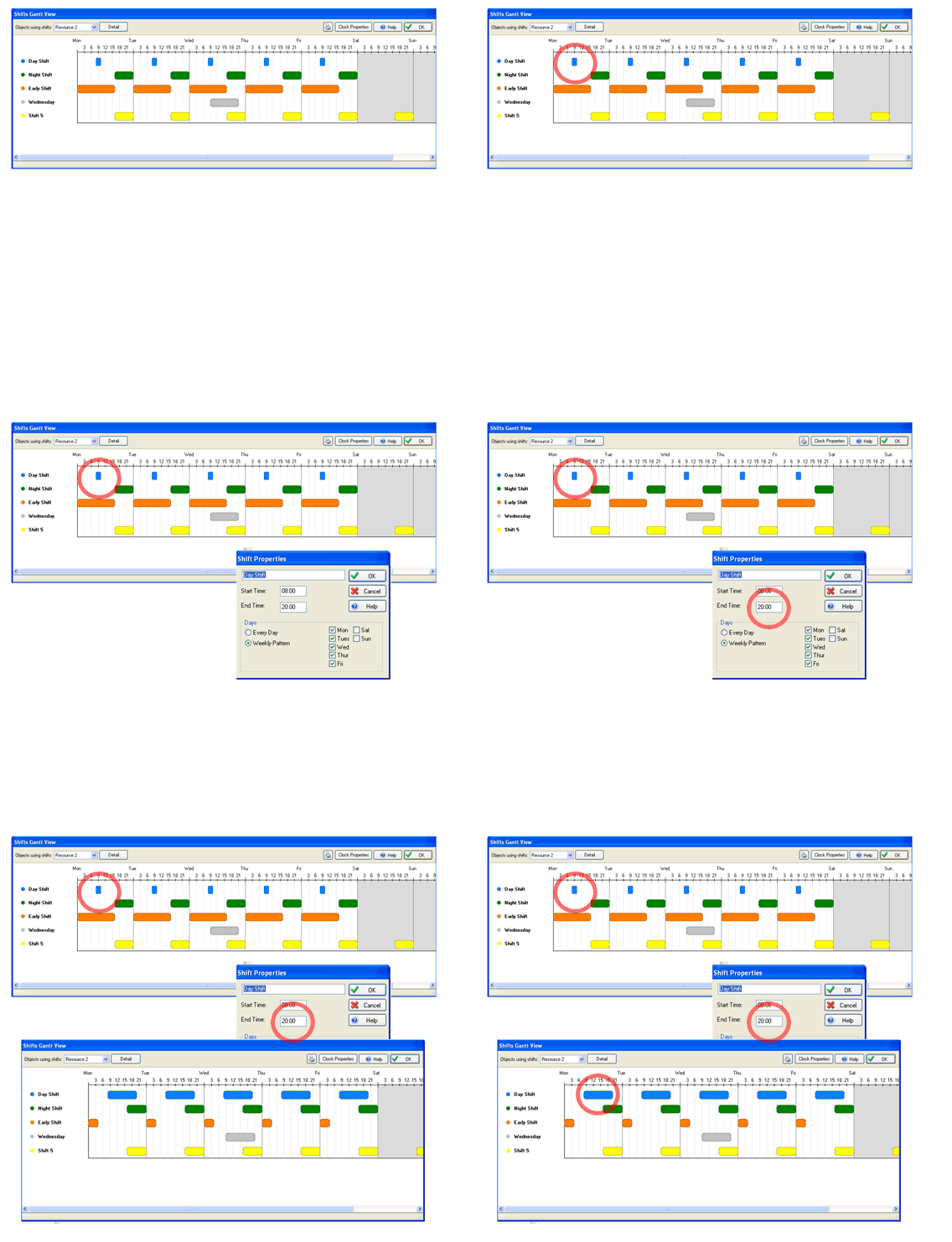
<p>You can now view all shift patterns side by side in an easy-to-understand Gantt chart view. This is a big improvement over previous editions, which required you to return to a long list of individual shift patterns.</p>
<p>Even better, when you make changes to shift patterns, you can instantly see the outcome on the new Gantt chart.</p>
</div>
<p>﻿<span class="full-image-block ssNonEditable"><span><img src="http://www.novasim.com/storage/simul8-images/SIMUL8_Shift_Gantt.gif?__SQUARESPACE_CACHEVERSION=1270236801614" alt="" /></span></span></p>]]></content></entry><entry><title>Agent Based Simulation</title><category term="Exceptional"/><category term="Professional"/><id>http://www.novasim.com/simul8-2010/agent-based-simulation.html</id><link rel="alternate" type="text/html" href="http://www.novasim.com/simul8-2010/agent-based-simulation.html"/><author><name>NovaSim</name></author><published>2010-04-02T18:19:00Z</published><updated>2010-04-02T18:19:00Z</updated><content type="html" xml:lang="en-US"><![CDATA[<div>
<p>SIMUL8 has responded to the buzz on agent based simulation by adding Visual Logic directly to work items. While not everyone has a need for this capability, there are some applications that will now be much easier to model. Common applications include consumer behavior, social networks,  edpidemiology, and evacuation to name just a few.</p>
<p>In standard Discrete Event Simulation languages (of which SIMUL8 has long been an example), all intelligence in a system is encapsulated in the simulation objects (such as work centers). Work items are passive and are simply passed around according to the logic of the other objects.&nbsp; In an agent-based simulation, however, the work items themselves have intelligence and may interact with other work items.</p>
<p>SIMUL8 2010 makes it possible to incoroprate work item-based intelligence into your model by allowing you to attach Visual Logic code directly to work items. Even better, because all of SIMUL8's discrete event and continuous simulation features are still there, you can now create powerful hybrid models.</p>
</div>
<div>
<p>&nbsp;</p>
</div>]]></content></entry><entry><title>Carbon Footprint Calculator</title><id>http://www.novasim.com/simul8-2010/carbon-footprint-calculator.html</id><link rel="alternate" type="text/html" href="http://www.novasim.com/simul8-2010/carbon-footprint-calculator.html"/><author><name>NovaSim</name></author><published>2010-04-02T18:18:45Z</published><updated>2010-04-02T18:18:45Z</updated><content type="html" xml:lang="en-US"><![CDATA[<div>
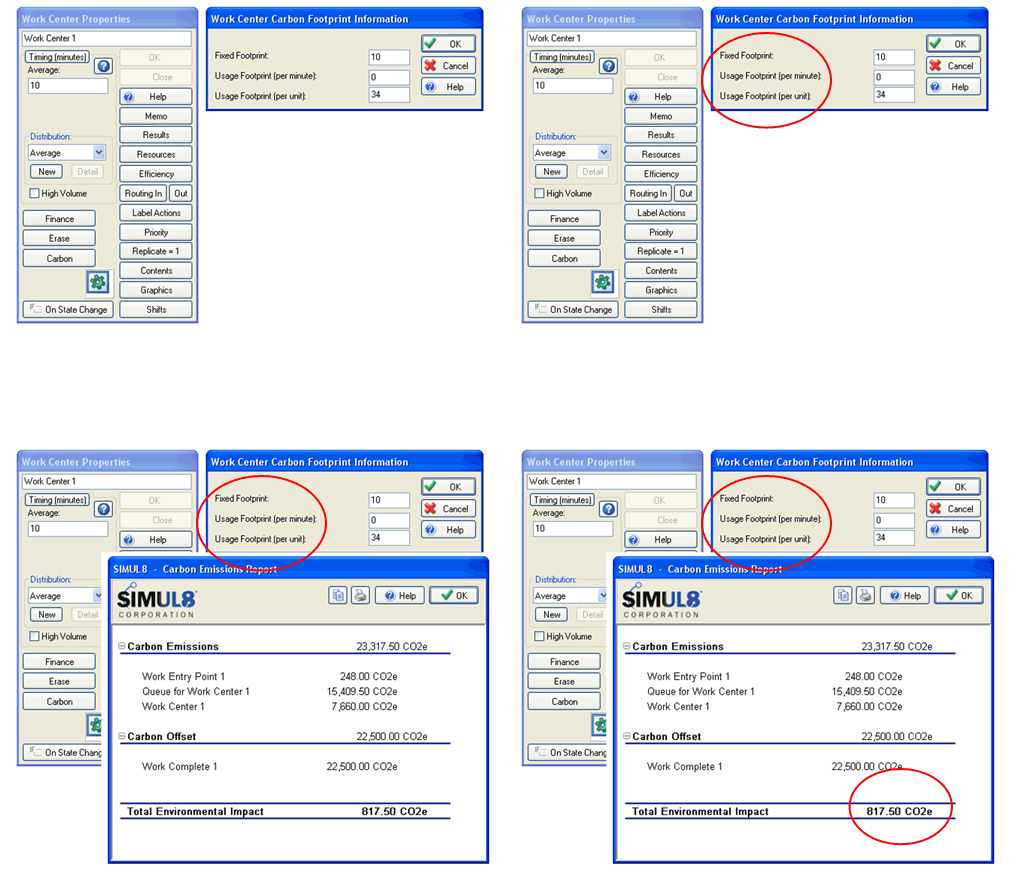
<p>Long term SIMUL8 users who have tried SIMUL8's activity based cost features will recognize the concept here. Instead of tracking costs, however, the carbon footprint calculator now tracks carbon emissions generated by each simulation object (both fixed and variable), as well as any offset generated  by your process.</p>
</div>
<div></div>
<p>Once you've set up the calculator, you can view  a report at the end of your run displaying total  emissions  generated.</p>
<p><span class="full-image-block ssNonEditable"><span><img src="http://www.novasim.com/storage/simul8-images/SIMUL8_Carbon.gif?__SQUARESPACE_CACHEVERSION=1270238616462" alt="" /></span></span></p>]]></content></entry></feed>